The Inbox That Answers Itself, Almost: An AI Email System That Drafts but Never Sends
A Gmail and Google Gemini workflow that reads incoming email, decides whether it deserves a reply, sorts it by intent, and drafts a category-specific response, then hands it to a person to send. Here is the design, and why the human stays in the loop on purpose.
Most "AI email" demos end with the same magic trick: a bot reads a message and fires back a reply on its own. It looks impressive for about ten seconds, right up until it confidently answers the wrong question in your name.
The better design does the opposite. Let the machine handle the tedious 80%: reading, sorting, the first draft. Then stop. A person decides what actually goes out. Here is the workflow built to do that.
Step One: Is This Even Worth a Reply?
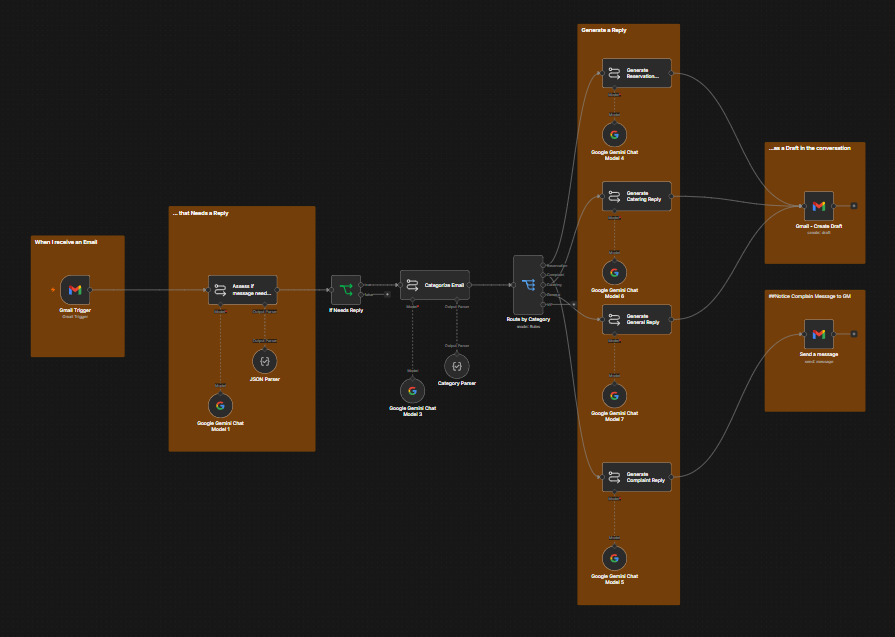
Every incoming email hits a Gmail trigger, and the first thing that happens is a filter, not a reply. A Gemini model reads the message and answers one question: does this actually need a human response? Receipts, newsletters, automated confirmations, and the rest of the daily noise get marked and left alone.
This gate matters more than the fancy generation later. An automation that tries to reply to everything is worse than no automation, because now you are reviewing drafts for emails that never needed one. Filtering first is what keeps the whole thing from becoming busywork.
Step Two: Sort by What the Sender Actually Wants
Anything that clears the gate goes to a second Gemini step that reads for intent and drops the message into one of a few buckets: a reservation, a catering request, a general question, or a complaint.
Categorizing before writing is a deliberate choice. A single generic "reply to this email" prompt produces generic, hedging replies. Knowing the category up front means the next step can use a prompt written for that exact situation, which is the difference between a draft you edit lightly and one you delete and start over.
Step Three: A Different Writer for Each Lane
Each category routes to its own Gemini writer with its own instructions: reservation, catering, general, or complaint. The reservation writer confirms details and offers times. The catering writer asks the questions a catering lead actually needs answered. The general writer stays short and helpful.
On the first three lanes, the output does not go to the customer. It is saved with Gmail Create Draft in the original thread, ready for a person to read, adjust, and send. The machine did the blank-page work. The human keeps the judgment and the signature.
The One Path That Breaks the Pattern
Complaints still get a Gemini writer. They do not get a customer draft.
After Generate Complaint Reply, the workflow sends an internal Gmail notice to the GM with the original message and suggested language. There is no Create Draft aimed at the customer. That is the most important design decision in the system. The moment a customer is upset is exactly the moment you do not want an AI reply sitting in the thread waiting to be rubber-stamped. Unhappy customers get a human from the first word. The automation's job there is speed of awareness, plus a private draft for the owner, not a public send.
Why Draft, Not Send
The whole system is built around one line you can draw through it: the AI drafts, a person sends.
That is not a limitation to apologize for. It is the point. Full auto-send saves a few seconds per email and risks the brand on every one of them. Draft-and-review saves the real cost: reading, sorting, staring at a blank reply box, while a human stays accountable for anything that leaves the building. For a business where the inbox is a relationship and not a ticket queue, that trade is not close.
If you are looking at your own inbox, the useful question is not "can AI answer this for me." It is "which of these does AI need to answer at all, and which one should never leave without me reading it first." Answer that, and the workflow above mostly designs itself.
For the full build, the actual n8n canvas wired for a real Raleigh restaurant inbox, see the portfolio case study: AI email response system.
Jason H. Vo
Marketing Analytics & Workflow Automation